Navalyze · How to use
How to use Navalyze
Navalyze turns the EU's public ship emissions reports into benchmarks you can read in a few minutes. This page shows where things are and how to read them. For how each figure is calculated, see the methodology.
Quick start
- 1Search for your company
Type a company, group, ship name or IMO number in the search box at the top of every page.
- 2Add your competitors
On the compare page, add the competitors you want next to it. Try Maersk, CMA CGM and Hapag-Lloyd.
- 3Switch the perspective
Technical shows how ships perform. Commercial puts a price on it through the EU ETS.
1.What Navalyze shows
Every ship over 5,000 GT that calls at EU and EEA ports reports its fuel and emissions each year to THETIS-MRV, run by the European Maritime Safety Agency. Navalyze reads every public report from 2018 to 2025, about 18,900 for 2025 alone.
From the 2025 reporting year the EU MRV Regulation also covers general cargo ships of 400 to 5,000 GT and offshore ships from 400 GT. To keep the year-on-year trend fair, the 2025 medians for those two segments use only ships that also reported in 2024.
- Market: the whole fleet for one year, split by segment (container, tanker, ro-pax and so on).
- Compare: companies, groups or verifiers side by side.
- Ships: one page per ship, with every year it reported.
The public files name the managing company (the ISM company) only from 2024. So company comparisons cover 2024 and later; for 2018 to 2023 you can compare ships by IMO number.
2.The controls
The bar at the top of the market and compare pages holds four controls. They stay as you set them while you move between pages.
- Year
- Picks the reporting year. Changing it keeps you on the same segment or comparison.
- Technical / Commercial
- Technical shows fuel, speed and CO₂ per transport work, for vessel performance teams. Commercial shows EU ETS allowances and their cost, for management and finance.
- CO₂ / CO₂eq
- CO₂eq adds methane and nitrous oxide to CO₂. It changes CO₂ per transport work and total emissions. The difference is about 2% for oil-fuelled ships and up to a third for LNG ships, because of methane slip. Shown from 2024, the first year the files report CO₂eq.
- EUA price
- Under Commercial, a slider sets the price of one EU ETS allowance. Every euro figure on the page follows it.

3.Find your company or ship
The search box at the top of every page finds companies, groups, ships (by name or IMO number) and verifiers. Pick a result to open its page.
- Company means the ISM company that holds the ship's Document of Compliance, as reported to THETIS. It is usually the manager, not the owner.
- Group joins the ISM companies that belong together, such as the ISM companies that manage Maersk's ships. Groups are the same on every page.
4.Compare with competitors
Pick your company first, then add competitors, up to six operators in all. The first one you pick is marked "your view".
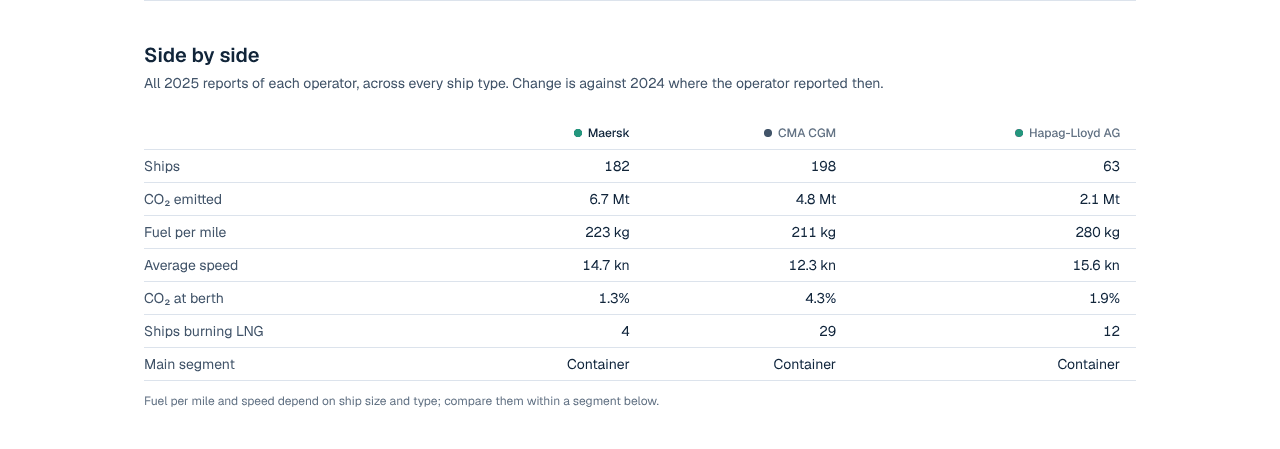
- Side by side: fleet size, total emissions, fuel per mile, speed and LNG ships, with the change on the year before.
- Segment by segment: the fairer comparison. A container line is compared on its container ships only, against the median ship of that segment.
- Ships furthest from their peers: each ship's CO₂ per transport work against the median ship of its type and size. −15% means 15% less CO₂ for the same work than a typical ship its size; +30% means 30% more.
Fuel per mile and speed depend on ship size, so compare them within a segment, not across a whole fleet.
5.Read a segment
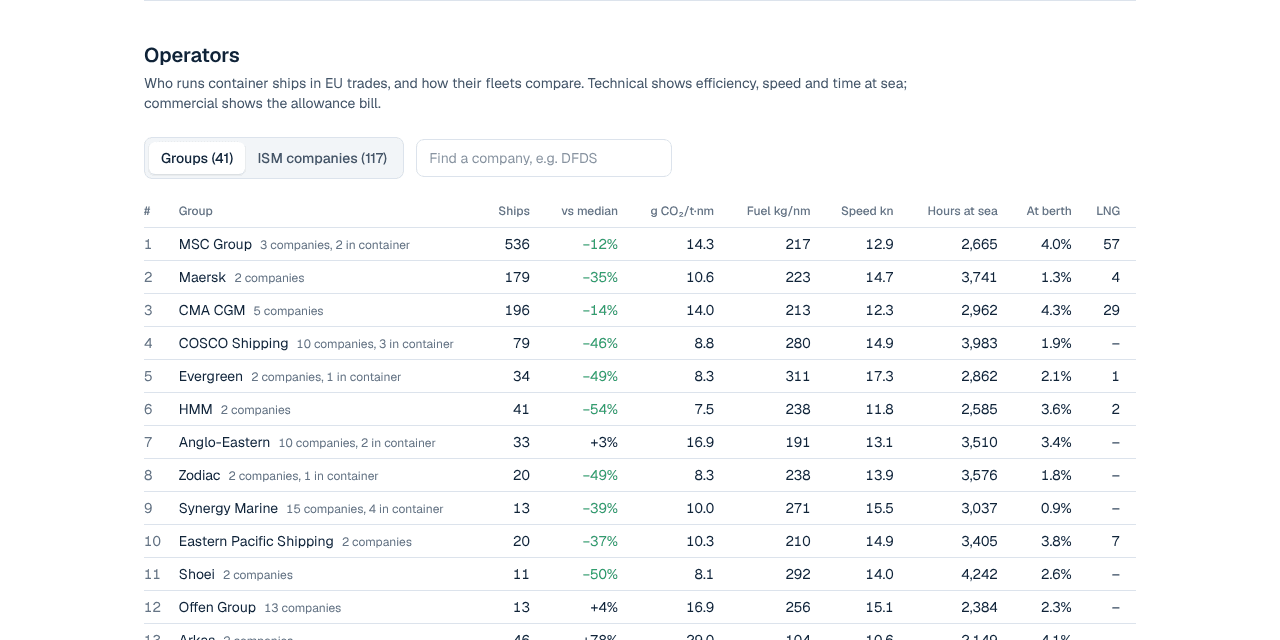
Each segment page shows how wide the performance gap is and who the operators are.
- Spread: the box holds the middle half of the ships; the line runs from the best 10% to the worst 10%. A wide box means a lot of room to improve.
- Operators: every group or ISM company with at least three ships in the segment. Click a column to sort.
- Ro-pax ships carry both passengers and freight, so their pages show CO₂ per passenger-mile and per tonne-mile of freight next to each other.
6.Read a ship page
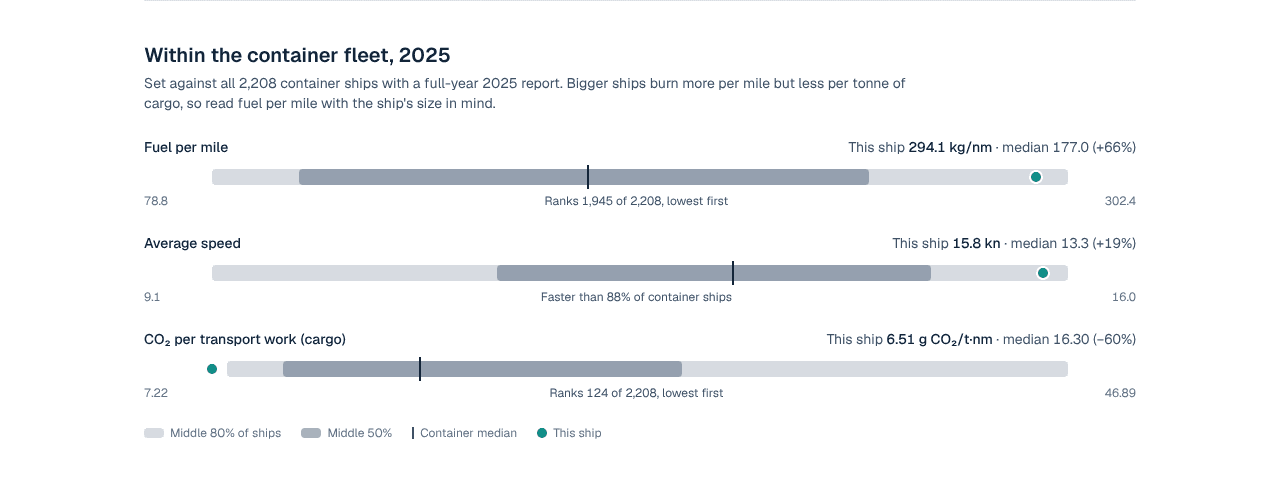
A ship page shows every year the ship reported, and where it sits in its segment.
- Use the year buttons to move between reports.
- Within the fleet places the ship on the spread of all ships of its type that year. Left of the median is better.
- Every reporting year lists each report. A ship that changed operator during a year has a part-year report for each.
7.Key terms
- CO₂ per transport work
- Grams of CO₂ per unit of cargo carried one nautical mile: per tonne for cargo ships, per passenger for passenger ships, per m³ or per dwt for some segments. Lower is better.
- CO₂eq
- CO₂ plus methane (CH₄) and nitrous oxide (N₂O), weighted by their warming effect.
- Fuel per mile
- Kilograms of fuel burned per nautical mile sailed. The main fuel KPI, but it grows with ship size.
- Median
- The middle ship: half the ships do better, half do worse. Navalyze compares with the median, not the average, so a few extreme ships don't skew it.
- Size band
- Ships of the same type and similar cargo size. Comparing within a band keeps large ships from looking better just for being large.
- EUA
- An EU ETS allowance, one tonne of CO₂. Shipping surrenders them for 40% of 2024 emissions, 70% for 2025 and 100% from 2026.
- Cost of the performance gap
- The allowances a fleet would save if each ship ran at the median of its size band, valued at the chosen EUA price.